Web Presence for Small Businesses
In today’s digital-first world, having an online presence isn’t just an advantage—it’s a necessity. If your business isn’t online, potential customers may never find you. While a professionally designed website can be costly, creating a simple and effective site on your own is completely doable. Even a basic website helps establish trust, showcase your offerings, and make your business accessible to a wider audience. Social media is another powerful tool for building your digital footprint. By maintaining an active presence on platforms where your audience spends time, you can increase visibility, engage with potential customers, and strengthen your brand. A combination of a well-built website and strategic social media use can significantly enhance your business’s reach and credibility.
Building a Website
The first steps in building a website include selecting a web hosting provider, deciding on a domain name, and choosing a content management system (CMS).
Domain Name

Behind the scenes, an IP address is a series of numbers, such as 144.71.622. Since this is difficult to remember, the Domain Name System (DNS) simplifies website navigation by linking domain names to their corresponding IP addresses. Think of DNS like your phone’s contact list—you don’t memorize every phone number, you just search for a name. DNS does the same for websites, making them easy to find.
Domain Name
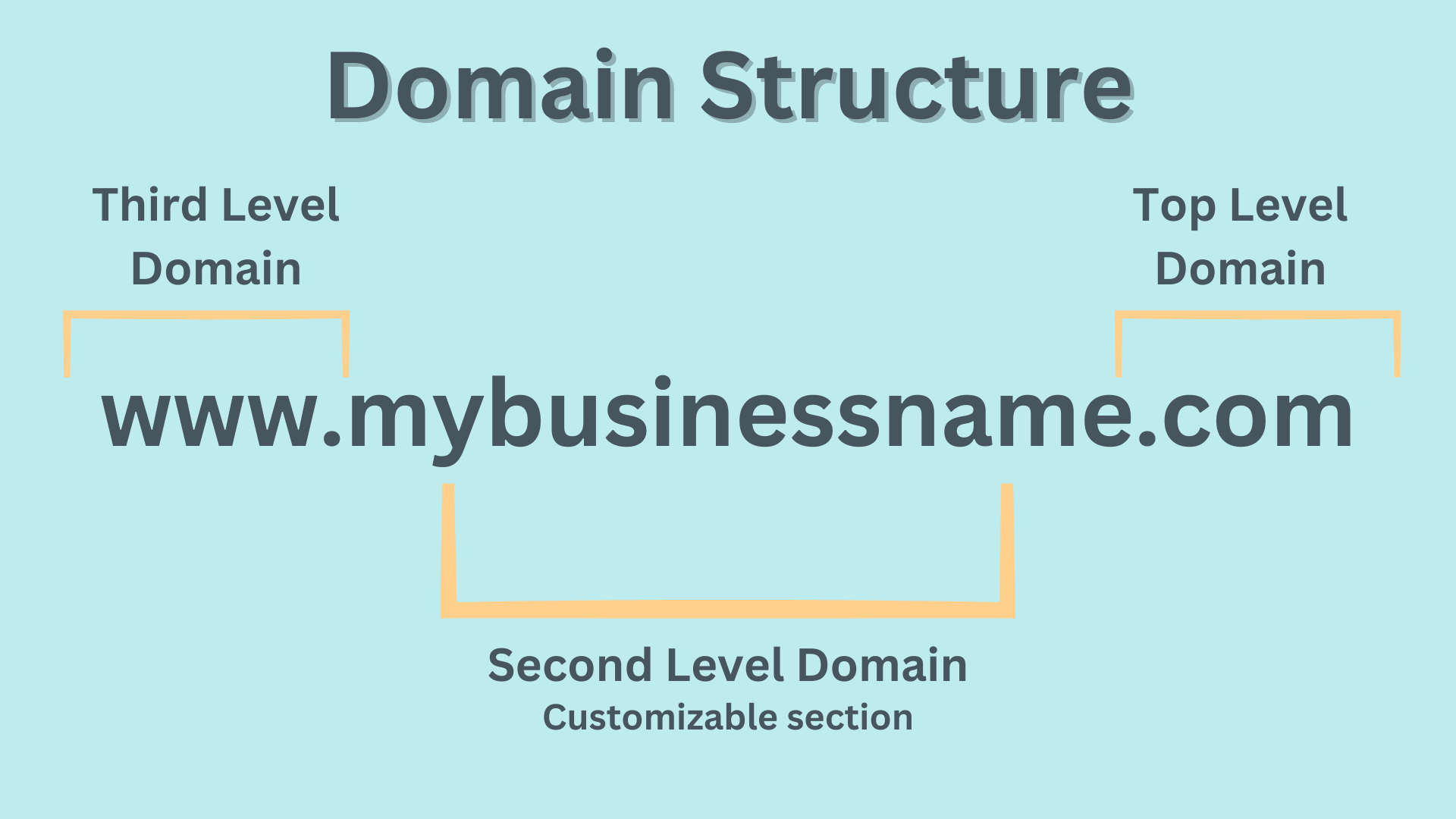
Top Level Domain: The final part of a web address. Different kinds include:
- Generic top level domain: .com, .net, .org (used for general purposes)
- Country code top level domain: .uk, .us
- Sponsored top level domain: .gov, .edu, .mil, (sponsored by private entity)
Second Level Domain: The customizable part of a domain name.
Third Level Domain: The first section, such as ‘www,’ ‘blog,’ or ‘support.’
When Choosing a Domain Name, Consider...
- Website purpose: Pick a name that reflects your business or industry.
- Target audience: Ensure it’s appealing and relevant to the people you want to target.
- Domain availability: Avoid names too similar to competitors or ones that could cause confusion.
Tips for Choosing a Domain Name
- Keep it short: Simplicity helps users remember it.
- Avoid numbers: These can easily be mistyped
- Use keywords: Incorporate relevant terms to boost SEO.
- Get creative: Make it unique while still being clear
- Consider future growth: Pick a name that can scale with your business.
Web Hosting
A web hosting server stores all of your website's files and makes them accessible on the internet. Choosing the right host is crucial for your site's performance, security, and scalability.
Key Factors to Consider
- Resources: Ensure your hosting plan includes enough storage, bandwidth, and RAM to support your website’s needs.
- Uptime: Look for a provider with at least 99.9% uptime to keep your site accessible at all times.
- Performance: A fast-loading website is essential for user experience. Choose a host known for speed and reliability to prevent slowdowns or frequent server issues.
- Scalability: As your business grows, you may need more resources. Select a provider that makes upgrading (or downgrading) seamless.
- Security: Prioritize hosts that offer SSL certificates, firewalls, automated backups, and other protective measures to keep your site safe.
- Customer Support: Reliable 24/7 customer support can make all the difference when troubleshooting issues.
- Pricing: Compare different hosting plans to find one that fits your budget while meeting your business needs.
Content Management Systems
A content management system is a system for building, manage, and deliver web content.




WordPress
Benefits
Downsides
Cost
Website Content
Creating a well-structured website with the right content is key to building trust, engaging visitors, and converting them into customers. Here are the essential pages and elements your website should include:

Contact Info
Make it easy for potential clients to reach you. Include a contact form, email address, phone number, and details on how to book an appointment or consultation.
About Page
Share your business’s story, mission, and values. Including biographies of yourself and your team helps personalize your brand and build a connection with visitors. A compelling, authentic story fosters trust and encourages engagement.
Description
Clearly outline what your company does, its mission statement, and key goals. Highlight the most important aspects of your business to help clients understand what sets you apart.
Testimonials
Featuring customer testimonials builds credibility and reassures potential clients by showcasing real, positive experiences. People trust businesses with strong social proof.
Blog
A blog is a powerful tool for SEO, customer education, and engagement. Regularly posting industry insights, updates, and announcements helps establish authority in your field while driving traffic to your site.
Social Media
Social media is a powerful tool for small business owners to build brand awareness, connect with potential customers, and drive traffic to their websites. Different platforms serve different purposes, and understanding which ones align with your business goals is key. While content can vary, posting consistently across multiple platforms will help increase visibility and engagement. Use social media to announce new blog posts, upcoming events, promotions, or quick industry tips. Always include a call to action—such as a website link, contact info, or direct messaging option—to encourage potential customers to take the next step.






Posting Content
Audience Demographics